Chitika is one of the advertising programmes that is an alternative to Google AdSense.
Initially, their ads were only shown to website-visitors who were in the USA and Canada. That list extended a while ago. Now they say that they're available in all countries.
Actually, their post makes it sound like you can sign-up as a publisher no matter what country you are in. But I was signed up while they were still limited to showing ads to USA/Canada visitors, despite not being in those countries. So I'm pretty sure that they mean their ads will be shown in all countries.


Showing posts with label Chitika. Show all posts
Showing posts with label Chitika. Show all posts
Saturday, 4 August 2012

Saturday, 20 August 2011
Chitika overview
This article is an introduction to the Chitika advertising programme, which is one of the alternatives considered by bloggers whose sites are not eligible to use Google AdSense.
 Chitika is another advertising programme - similar to Google AdSense, but run by a different company with slightly different rules and ways of publishing advertisements.
Ads shown by Chitika are not context-sensitive. Instead, they are selected for your site using the search-terms a user entered to find the site.
Because they're not context-sensitive, you can display them on the same pages as AdSense ad-units. At least the reason Chitika give - personally I've never been able to to find the AdSense condition that says "we must be the only context sensitive ads on a page", just one that says "no ads that look like ours".
Who sees Chitika ads:
Origianlly, Chitika ads weren't worldwide: they were only displayed to readers from Canada and the US who got to your site by searching. However this has been changed: now they have two products:
If you want, you can opt-out of showing Select ads, so that visitors who don't get Premium ads don't actually see an ad at all.
You can see an example of Chitkia ads here: this opens a new window showing you this page (the one you're reading now) as it would look to someone who arrives at the site by searching for "Blogger Hints".
How to sign up for Chitika:
You sign up for Chitika in the usual way - they ask for a range of information about you and your website. They do personally check each site, so it may take a few days or even weeks for account approval to come through .
It's a bit more "tecchie" to set up than AdSense - mainly because you need to install code from Chitika into your blog, instead of being able to just add a gadget in Blogger. But (in 2010), I was able to log in for the first time, read the terms and conditions, mess around with some ad-formats, and place ads on my site in less than 2 hours this evening, with no glitches along the way.
Terms and Conditions:
This article is based on my understanding of the terms and conditions of Blogger, AdSense, and Chitika - as at today. These companies may change their policies at any time, so before you implement anything, it is essential that you read the currrent T&C documents yourself, to sure that your site will comply.
Chitika has some quite stringent conditions. For example, you can't use it on site promoting sale of alcohol, tobacco, haz-chem, weapons, and some other things. This bit is quite near the end of their terms-and-conditions document - yet another reason to double-check before you start showing Chitika ads.
Related Articles:
Some other dvertising programmes
Setting up AdSense on your blog
Installing code from advertisers etc into your blog
More details about the Chitika programme.
Sign up for Chitika
 Chitika is another advertising programme - similar to Google AdSense, but run by a different company with slightly different rules and ways of publishing advertisements.
Ads shown by Chitika are not context-sensitive. Instead, they are selected for your site using the search-terms a user entered to find the site.
Because they're not context-sensitive, you can display them on the same pages as AdSense ad-units. At least the reason Chitika give - personally I've never been able to to find the AdSense condition that says "we must be the only context sensitive ads on a page", just one that says "no ads that look like ours".
Who sees Chitika ads:
Origianlly, Chitika ads weren't worldwide: they were only displayed to readers from Canada and the US who got to your site by searching. However this has been changed: now they have two products:
- Premium, shows ads related to the search query used by people who visit your site and come from one of Chitika's "accepted countries". Currently (Aug 2011) there are 12 of them, including the USA, Canada, United Kingdom, Germany, Italy, Spain, the Netherlands, Denmark, Norway, Sweden and India.
- Select, shows less-well-targetted ads to visitors from other countries, or who did not get to your site by searching for something.
If you want, you can opt-out of showing Select ads, so that visitors who don't get Premium ads don't actually see an ad at all.
You can see an example of Chitkia ads here: this opens a new window showing you this page (the one you're reading now) as it would look to someone who arrives at the site by searching for "Blogger Hints".
How to sign up for Chitika:
You sign up for Chitika in the usual way - they ask for a range of information about you and your website. They do personally check each site, so it may take a few days or even weeks for account approval to come through .
It's a bit more "tecchie" to set up than AdSense - mainly because you need to install code from Chitika into your blog, instead of being able to just add a gadget in Blogger. But (in 2010), I was able to log in for the first time, read the terms and conditions, mess around with some ad-formats, and place ads on my site in less than 2 hours this evening, with no glitches along the way.
Terms and Conditions:
Chitika has some quite stringent conditions. For example, you can't use it on site promoting sale of alcohol, tobacco, haz-chem, weapons, and some other things. This bit is quite near the end of their terms-and-conditions document - yet another reason to double-check before you start showing Chitika ads.
Related Articles:
Some other dvertising programmes
Setting up AdSense on your blog
Installing code from advertisers etc into your blog
More details about the Chitika programme.
Sign up for Chitika
Wednesday, 3 March 2010
Chitika | Select - expanding beyond search-traffic
On Mon 8 March, Chitika are introducing Chitika Select, a new advertising product that displays ads to some additional readers. This article is an initial overview of the implications for Blogger users.
Background:
Previously I've given an overview of Chitika.
At the time I wrote it, ads were only shown to visitors from the US and Canada (based on their IP address) who got to the website by searching. That has now changed.
What's Changing?
From Mon 8 March 2010, Chitika are introducing a new product called Chitika | Select, which they're describing as an upgrade to Chitkia | Premium. Under this new approach, ads will be displayed to readers who get to your site by search AND to others who some statistical techniques have predicted are more likely to click on ads.
Impact for Blogger users and readers.
Some ads (but not all of them) may look different - we don't have any details about this yet, and I'd guess won't until 8 March at least.
The announcements say that Chitika | Select ads will include both pay-per-click and pay-per-impression (CPM) banner and image ads, but they don't actually say whether the latter are a new feature being introduced with Select or not. The way that the opt-out feature is presented makes me think that they're probably new, though.
What's not changing:
Readers who
The alternative-ads feature will continue to work for Chitika Premium ads, but it wont' be there for Select.
There are some other Chitika products apart from Premium, but they're more focussed to shopping sites, so probably not used by Blog-spot users, and they don't appear to be affected.
For now, Chitika Select is only available for US/Canada readers. They say that the technology introduced behind Select will let them change this in the future, but it's not changing for now.
Related Articles:
Chitika Overview
Putting Chitika ads into your Blog
Extra customization of Chitkia ads
And from Chitika:
Background:
Previously I've given an overview of Chitika.
At the time I wrote it, ads were only shown to visitors from the US and Canada (based on their IP address) who got to the website by searching. That has now changed.
What's Changing?
From Mon 8 March 2010, Chitika are introducing a new product called Chitika | Select, which they're describing as an upgrade to Chitkia | Premium. Under this new approach, ads will be displayed to readers who get to your site by search AND to others who some statistical techniques have predicted are more likely to click on ads.
Impact for Blogger users and readers.
On Mon 8 March 2010, all existing Chitka | Premium ads will be upgraded to Chitika | Select - unless you opt-out of this by logging in to your account, going in to the My Account tab, and ticking the option(s) at the very bottom of the page.
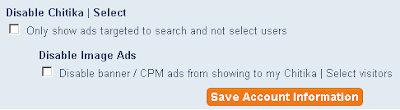
Your US and Canada readers may start to see more ads:
- Whether or not the do depends on their behaviour (and I'm guessing it will take a while to work out what sort of factors mean that people are predicted by be ad-clickers).
- Worst-case, seeing more ads could convince more readers to install ad-blocker software.
Some ads (but not all of them) may look different - we don't have any details about this yet, and I'd guess won't until 8 March at least.
The announcements say that Chitika | Select ads will include both pay-per-click and pay-per-impression (CPM) banner and image ads, but they don't actually say whether the latter are a new feature being introduced with Select or not. The way that the opt-out feature is presented makes me think that they're probably new, though.
What's not changing:
Readers who
- didn't get to the blog by searching, and
- who also aren't included in the group that Select ads are shown to
The alternative-ads feature will continue to work for Chitika Premium ads, but it wont' be there for Select.
There are some other Chitika products apart from Premium, but they're more focussed to shopping sites, so probably not used by Blog-spot users, and they don't appear to be affected.
For now, Chitika Select is only available for US/Canada readers. They say that the technology introduced behind Select will let them change this in the future, but it's not changing for now.
Related Articles:
Chitika Overview
Putting Chitika ads into your Blog
Extra customization of Chitkia ads
And from Chitika:
Saturday, 13 February 2010
Putting Chitika ads onto your Blog
This article is about putting Chitika ads into your site. It covers the features currently on Chitkia's AdSetup control panel, and how to take the code that is provided and put it into your own blog on blogspot.
Getting started
 Before you do anything else, check that you've considered the issues involved with advertising on your blog, and signed-up with Chitika.
Log on and choose setup:
To get the HTML/Javascript code for an ad-unit from Chitika, log on to the advertisers programme, and choose AdSetup / Chitika Premium from the tabs:

Unlike AdSense, Chitika does not currently store the ads you have generated before, so each time you want the ad-code you need to go through the steps and generate it.
You could just copy the ad-code that you used previously, however it may be best to get it from the official site each time: if you just keep re-using old format code, you'll never get the advantage of any new features they introduce, and eventually your old code may become unsupported.
Start the generation process:
Press Get Code
Choose the size from the drop down box, and wait a moment for the system to show you a sample ad in that size.
Click Continue to Next Step
Choose a Fallback option:
This is what is shown to readers who don't get Chitika ads.

Customise the colours and enter a channel:
If you want to monitor your ads progress with a channel, you need to enter the channel name here: the system doesn't show you a list of existing channel names, so you have to remember what values to use (or not use, if you want a separate channel for each ad).
Click Continue to Next.
Put the code into your blog, the same way you would add any other 3rd party code.
Related Articles:
Advertising on your Blog - things to consider
Putting HTML from other websites into your blog
Chitika Overview - background information about the Chitika advertising programme.
Extra customisation of Chitika ads
Getting started
Log on and choose setup:
To get the HTML/Javascript code for an ad-unit from Chitika, log on to the advertisers programme, and choose AdSetup / Chitika Premium from the tabs:

Unlike AdSense, Chitika does not currently store the ads you have generated before, so each time you want the ad-code you need to go through the steps and generate it.
You could just copy the ad-code that you used previously, however it may be best to get it from the official site each time: if you just keep re-using old format code, you'll never get the advantage of any new features they introduce, and eventually your old code may become unsupported.
Start the generation process:
Press Get Code
Choose the size from the drop down box, and wait a moment for the system to show you a sample ad in that size.
To help you choose, there is also a link which opens a new window showing you the sizes.
Chitika has a very wide range of available sizes (although you may be asked to use a different size in the next step if you want to use the Backfill option - keep reading for more info on this.)
Do remember that your readers will have many different screen sizes and resolutions, and default font sizes: don't assume that they will all see your blog the same way you do - ie, don't try to be too clever about choosing an ad-size that perfectly matches a block of text, because your readers won't necessarily see if that way. I'm going to write a longer article about this one day.
Click Continue to Next Step
Choose a Fallback option:
This is what is shown to readers who don't get Chitika ads.
The Chitika screen suggests that it's possible to show AdSense ads as an alternative, by putting the HTML for the alternative into a text file. I'm currently searching for a way to host text files that can hold the code for and AdSense ad that could be used in this way; so far, Google Docs and Scribd don't work for this purpose, because when the "text file" is opened it shows their pretty header first. I'm also sceptical about whether the Javascript that's inside an AdSense ad unit counts as "plain HTML" which is what is supposed to be in the text file. I will update this article if I find a way to make this work, as it could be a very nice feature to have.
Currently, I'm generally using "collapse" for the fallback option (ie users who don't see Chitika ads don't see anything, and no space is used), or occasionally Chitika Backfill (non-targetted ads) when I want readers to be aware of the ad. (For example, underneath the article summary in my Chitika overview article.)
If you choose Fallback, you will get a warning screen, making extra sure that you understand the consequences - you need to tick the "I understand ..." box before you can continue from this.

Customise the colours and enter a channel:
| This step is optional: an example of the type of ad you get if you don't choose any colour values is shown to the right of this paragraph. I don't know if Chitika chooses colours based on your layout, or (more likely) if it just uses default colours. You can either enter the hex-code, or choose a shade from their colour picker. | |
If you want your ad colours to blend with your blog colors:
| |
 |  |
If you want to monitor your ads progress with a channel, you need to enter the channel name here: the system doesn't show you a list of existing channel names, so you have to remember what values to use (or not use, if you want a separate channel for each ad).
Click Continue to Next.
Put the code into your blog, the same way you would add any other 3rd party code.
Related Articles:
Advertising on your Blog - things to consider
Putting HTML from other websites into your blog
Chitika Overview - background information about the Chitika advertising programme.
Extra customisation of Chitika ads
Extra customization of Chitika ads
This article looks at extra customisation you can do to Chitika advertsements, including making changes to the title colour, border colour, and whether or not a new window opens when a reader clicks on a Chitika ad.
 Previously I explained how to get Chitika ad code and how to put the code into your blog.
Chitika + AdSense: Ad Placement Guide is an e-book from Chitika about placing AdSense and Chitika ads in the same page in complementary ways.
It also has some tips about customisation - including some features that are not currently available from Chitika's control panel. Although changing ad features is not allowed by Chitika's Terms and Conditions, I am assuming that since Chitika are promoting these features, they are happy that using them doesn't violate the T&Cs. Therefore I'm explaining them in this article.
You need to consider this issue yourself, and only follow the advice here if you agree, or are willing to take any risks involved. No liability is accepted etc ....
This is how Chitika ad-code looks (with some explanations in CAPITAL LETTERS, and line-breaks to make it easier to read:):
You can add some extra lines to this, to put a background colour behind your ad, or to put a border around it:
Adding this line says that clicking the ad should open it in a new browser window or tab (depending on the reader's browser settings.
Any of these lines that you want to add can go in the same section with the "ch_" statements - the order doesn't matter.
Advertising on your Blog - things to consider
Chitika Overview - background information about the Chitika advertising programme.
Putting Chitika ads into your Blog
Putting 3rd party HTML into your blog
Chitika and ad-code

Chitika + AdSense: Ad Placement Guide is an e-book from Chitika about placing AdSense and Chitika ads in the same page in complementary ways.
It also has some tips about customisation - including some features that are not currently available from Chitika's control panel. Although changing ad features is not allowed by Chitika's Terms and Conditions, I am assuming that since Chitika are promoting these features, they are happy that using them doesn't violate the T&Cs. Therefore I'm explaining them in this article.
You need to consider this issue yourself, and only follow the advice here if you agree, or are willing to take any risks involved. No liability is accepted etc ....
Changing the code
This is how Chitika ad-code looks (with some explanations in CAPITAL LETTERS, and line-breaks to make it easier to read:):
<!-- TEXT ABOUT HOW TO SEE EXAMPLE ADS -->
<script type="text/javascript"><!--
ch_client = "YOUR ID";
ch_type = "mpu";
ch_width = 550;
ch_height = 250;
ch_color_title = "800040";
ch_color_site_link = "215670";
ch_color_text = "000000";
ch_non_contextual = 4;
ch_vertical ="premium";
ch_font_title = "Verdana";
ch_backfill =1;ch_sid = "THE CHANNEL NAME YOU USED";
SOME MATHS STUFF FOR CALCULATING ....
}
//--></script>
<script A SCRIPT NAME ...</script>
You can add some extra lines to this, to put a background colour behind your ad, or to put a border around it:
ch_color_bg = "HEX CODE FOR YOUR BACKGROUND COLOUR";
ch_color_border = "HEX CODE FOR YOUR BORDER";
Adding this line says that clicking the ad should open it in a new browser window or tab (depending on the reader's browser settings.
ch_target = "new";
Any of these lines that you want to add can go in the same section with the "ch_" statements - the order doesn't matter.
Related Articles:
Advertising on your Blog - things to consider
Chitika Overview - background information about the Chitika advertising programme.
Putting Chitika ads into your Blog
Putting 3rd party HTML into your blog
Subscribe to:
Posts (Atom)